This post is not about pointing out one OS’s security deficiency over other or trying to make some fanboy points with Linux users.The simple fact is once you have physical access to a computer all bets are off. This is true for all OS (to some extend) but some are easier to crack than others. I won’t talk about how to protect yourself from this kind of no-nonsense attack on this post, I will leave that for another day but for now, let’s assume that you have a legitimate reason to reset yours or your friend’s windows computer.
Prerequisite:
You need a Linux live CD, preferably Ubuntu live CD. Doesn’t have to be Ubuntu, it can be a custom Linux live distro with the right packages (the ones we need) installed. And you need to have the ability to boot from CD. Which should be pretty straight forward.
Step 1:
Boot in to your live CD and install chntpw
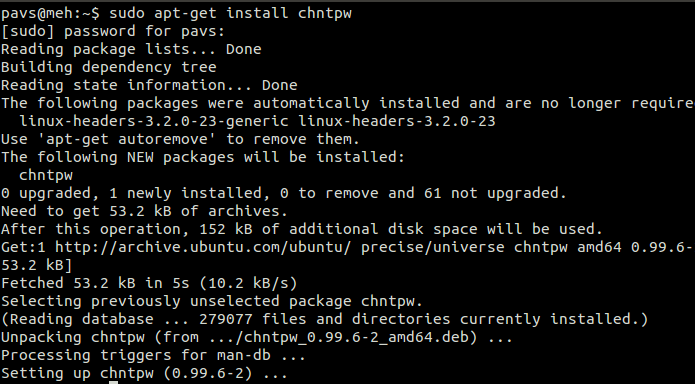
Step 2:
Do cat /proc/mounts to get the label of your windows HD. In my case:

Or to put it more simply its: AC264F02264ECD50
cd to your media label: cd /media/AC264F02264ECD50
Now cd to your system folder (windows 7): cd Windows/System32/config/
Step 3:
Change or reset windows admin password by running chntpw: sudo chntpw SAM
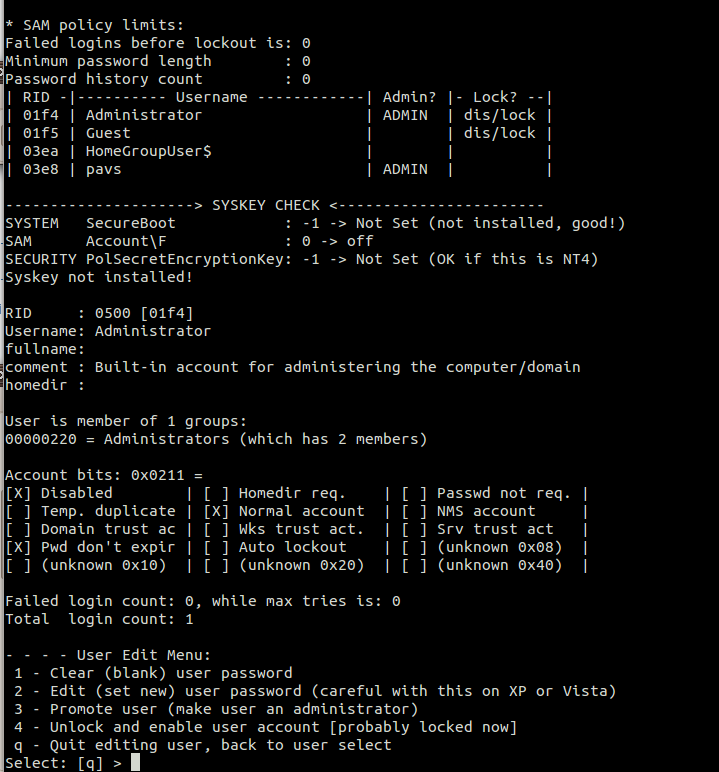
You will get a prompt and the options are self explanatory. For instance to reset password enter “1” and then “y” to confirm. To change password enter “2”, then your password, and “y” to confirm.
Done in 5 minutes (or so). This should work on all versions of windows since Windows2000.
You can also Reset Linux Root password in under 5 minutes and you don’t even need a livecd.